Why this matters
Cover the exact workflows that move a qualified lead from first contact to a booked appointment without double entry or staff bottlenecks.
Short Answer: prioritize triage-first intake, then booking
For emergency call triage for electrical contractors, the priority should be a triage-first intake workflow, not a generic “book every caller fast” flow.
That means the system should first gather the facts needed to screen urgency, then route true emergencies to a human escalation path, and only after that hand routine work into normal scheduling. For electrical contractors, that is the commercially sensible order because a power outage, burning smell, or panel issue may need immediate human review, while many other calls should become booked appointments without waking the owner or creating morning admin cleanup.
In practical terms, the strongest workflow does five things well:
- gathers safe intake details consistently,
- applies clear urgency rules,
- escalates urgent calls to a person,
- hands non-urgent work into scheduling without double entry, and
- leaves the owner in control of routing rules.
That same decision often sits behind related searches like AI appointment scheduling for home service contractors and AI booking software for electricians. The real buying question is not just how to answer calls. It is how to move a qualified lead from first contact to either the right human escalation or a clean booked appointment.
Public evidence here is useful for category direction, but thin on electrical-specific implementation detail. The cited vendor pages support product positioning and some integration claims, while buyers still need to verify setup burden, escalation-tree depth, write-back behavior, and electrical-specific rule flexibility directly.
Why emergency call triage matters more in electrical
Electrical after-hours intake starts with a different question than ordinary appointment scheduling.
It is not, “What slot is available?”
It is, “Does this call need human escalation now, or can it move into routine booking?”
That distinction matters because the cost of getting it wrong is high in both directions:
- If an urgent call sits in voicemail until morning, you risk lost revenue, poor customer experience, and a breakdown in emergency coverage.
- If every after-hours caller gets treated like an emergency, you burn technician time, owner time, and margin on jobs that should have been scheduled normally.
A strong intake process protects both response quality and operating leverage:
- urgent calls get live human attention fast,
- routine calls still turn into booked jobs,
- dispatch stays cleaner,
- and office staff avoid retyping the same details into multiple systems.
For electrical teams, the workflow matters more than a broad feature list.
What buyers should verify before choosing a system
Because the current evidence set is mostly vendor-published material, buyers should focus less on marketing labels and more on workflow proof. Before you commit, verify:
- whether urgency rules can be customized for electrical scenarios,
- whether the system writes directly into ServiceTitan or Housecall Pro or only passes a lead,
- whether it respects calendar and dispatch constraints,
- whether routine bookings trigger confirmations automatically,
- whether owners or managers can change routing rules without vendor intervention,
- and what actually happens after hours when the first human contact does not answer.
Those checks matter more than broad AI claims.
What a strong electrical triage system needs to do
A workable electrical triage system should be judged by workflow fit, not just by whether it answers calls.
Separate urgency from convenience
Many booking tools are designed around convenience: collect contact details, find a time, and confirm the appointment.
Electrical after-hours intake has a different first job. It must identify which calls should not go through a standard scheduling path until urgency is screened. That is why electrical teams evaluating broader booking and scheduling workflows still need a triage-first design.
Gather enough detail without turning into diagnosis
The intake layer should collect the facts needed for routing, but it should not drift into troubleshooting or diagnosis.
The goal is classification and handoff, not technical advice. For electrical contractors, that usually means capturing who is calling, where the issue is happening, how to call back, and a short issue summary that can be evaluated against your escalation rules.
Support reliable human escalation
A real emergency workflow needs named human paths.
That may include:
- an after-hours dispatcher,
- an on-call technician,
- a service manager,
- or the owner as backup.
If the system cannot route urgent calls to a person reliably, it is not solving emergency triage.
Hand routine work into normal booking
Once urgency is screened out, the system should shift the caller into a standard booking path. That might mean direct scheduling into the field service system or a structured next-business-day follow-up. The key is avoiding duplicate entry and keeping the appointment process connected to how your office already operates.
For trade-specific context on intake and routing needs, see electrical service workflows.
The recommended workflow for after-hours electrical intake
For many electrical contractors, the most practical architecture is:
AI receptionist or structured intake layer + field service management system + explicit human escalation tree
That recommendation fits the product roles visible in the current evidence.
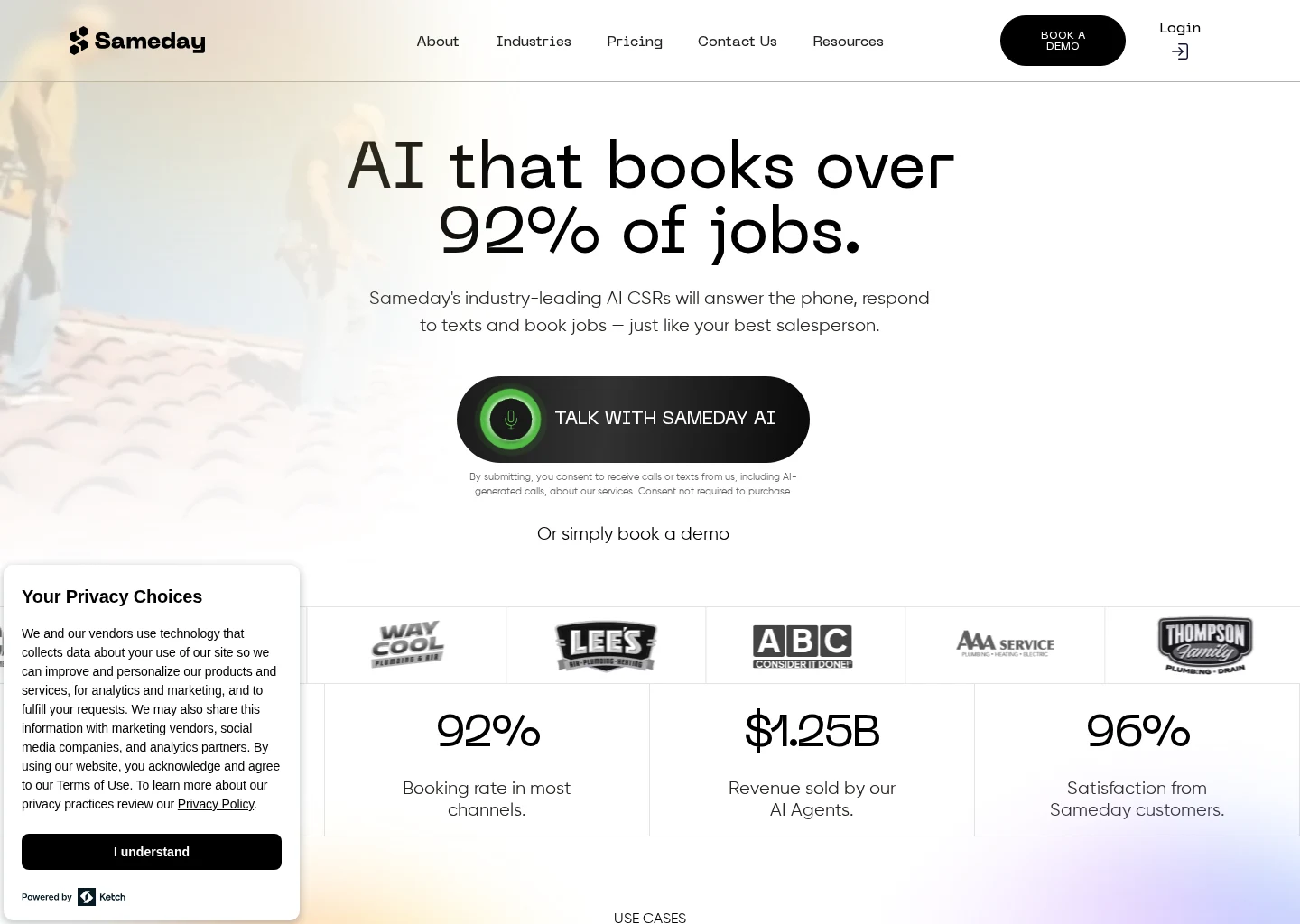
Sameday describes itself as an AI receptionist and scheduling product for home service businesses and lists integrations with ServiceTitan and Housecall Pro. ServiceTitan describes itself as a field service management platform for home service operations, including dispatch and scheduling. Housecall Pro describes itself as a field service management platform for scheduling, dispatch, invoicing, and customer communication.
That does not prove every integration behaves the same way in practice. It does show the stack buyers should evaluate: an intake layer that screens urgency in front of the system of record you already use to schedule and dispatch work.
1. Capture intake facts first
The first step should be a short, controlled intake that records the details needed for routing:
- caller name,
- phone number,
- service address,
- call-back number if different,
- brief description of the issue,
- whether the caller mentions a power outage, burning smell, or panel issue,
- and preferred timing if the request appears routine.
This gives the business enough information to decide what should happen next.
2. Apply urgency rules before showing appointment options
After intake, the workflow should evaluate the issue against your electrical urgency rules.
The system should distinguish between:
- issues that require immediate human escalation,
- issues that need prompt review but not necessarily emergency dispatch,
- and routine work that can move into standard booking.
This is the decision point that generic scheduling demos often underplay.
3. Route urgent calls to a human path
If the call matches emergency criteria, the next step should be human escalation, not self-service booking.
You should be able to define:
- who gets contacted first,
- who gets contacted second,
- and what happens if the first person does not respond.
Without that logic, “urgent escalation” is just a label.
4. Hand routine work to normal booking
If the urgency screen does not flag the call, the workflow should move into ordinary scheduling.
That is where AI booking and appointment automation matter: calendar accuracy, dispatch compatibility, confirmation flows, and record creation all affect whether screened calls actually become booked jobs without office rework.
Escalation examples electrical contractors should define now
You do not need a giant playbook to improve after-hours handling. You do need a few clear escalation examples that everyone agrees on.
Power outage example
A power outage call should not be treated automatically as routine scheduling.
The system should capture the basic intake details, then apply your company’s urgency rules to determine whether the call requires immediate human escalation or priority review. For some contractors, that may depend on customer type, service area, or whether the outage affects an entire property versus a narrower scope of work.
The purpose of intake here is routing discipline, not diagnosis.
Burning smell example
A burning smell report is one of the clearest cases for human escalation.
A generic “next available appointment” workflow is too blunt for this type of call. The intake system should still gather identity, location, and issue summary consistently, but the handoff should move to a live person based on a predefined escalation path.
Panel issue example
A panel issue needs structured handling because the label can cover both routine and high-priority situations.
Your workflow should capture that label, collect the job basics, and apply your company’s urgency policy before deciding whether to escalate or schedule. This is exactly where configurable rules matter. A generic home service bot may not match your standards for panel-related calls unless you can control the logic.
Human escalation paths that prevent dead ends
Many contractors focus on intake questions and forget the harder part: what happens after the system decides a call is urgent?
If the answer is vague, triage fails.
A practical human escalation path usually includes three layers.
Primary contact
This is the first live person or on-call role the system should route to for urgent after-hours electrical calls. It might be an after-hours CSR, dispatcher, service manager, or rotating technician lead.
Secondary fallback
If the primary contact does not answer, the workflow needs a second destination. That might be another manager, another dispatcher, or the owner as backup. Without a fallback, “urgent” still turns into a dead end.
Documentation and visibility
After escalation, the intake record still needs to be visible to the office. If a technician handles the call but nobody can see the intake or routing outcome in the morning, the process creates new confusion. Buyers should verify how the system logs the conversation, creates or updates records, and shows what happened.
If you are evaluating front-desk tooling more broadly, compare how each AI front desk workflow handles escalation ownership, routing visibility, and record handoff rather than judging only the answering experience.
Where AI appointment scheduling fits this decision
The query AI appointment scheduling for home service contractors sounds broader than emergency electrical triage, but the decisions overlap heavily.
Once a call is screened and determined to be non-urgent, the business still needs accurate scheduling. That includes:
- finding a usable slot,
- matching the request to the right workflow,
- creating or updating the customer record,
- avoiding double entry,
- and sending confirmations.
That is why triage and scheduling should be evaluated together. If you buy triage without a solid booking handoff, the office still cleans up the data later. If you buy scheduling without triage, urgent electrical calls may be mishandled.
For electrical contractors, the emergency screen and the booking engine are often two stages of the same intake system.
Where AI booking software for electricians fits
The query AI booking software for electricians is usually framed around speed and convenience, but the more important question is what happens before booking.
A booking tool creates value when it converts qualified routine demand into scheduled work without extra office labor. It is much less valuable if it cannot distinguish routine work from after-hours urgency.
That means the strongest buying criteria are not just:
- does it book,
- does it sound polished,
- or does it offer self-service scheduling.
They are:
- does it book only after urgency is screened,
- does it integrate with the FSM you already use,
- does it keep dispatcher workload manageable,
- and does it leave escalation thresholds under owner control.
For broader category context, compare your options against the core evaluation criteria in AI booking software: booking accuracy, system integration, confirmation flows, and the rules that determine when a call should not be booked automatically.
How the current evidence maps to product categories
The available sources are more useful for understanding product roles than for naming a universal winner.
AI receptionist and intake layer
Sameday describes itself as an AI receptionist and scheduling product for home service businesses, with listed integrations that include ServiceTitan and Housecall Pro. That makes it relevant to the intake-and-handoff layer electrical buyers should evaluate.
AgentZap describes itself as AI receptionist software and, in the cited materials, emphasizes plumbing answering and dispatch workflows with integrations that include ServiceTitan and Housecall Pro. That helps confirm the broader category pattern: there are AI receptionist products built around home service intake and dispatch connections. But because the cited trade-specific example is plumbing-oriented, electrical buyers should verify fit rather than assume the same escalation logic will carry over unchanged.
Field service management core
ServiceTitan describes itself as a field service management platform used by home service teams for dispatch, scheduling, and customer workflows.
Housecall Pro describes itself as a field service management platform for scheduling, dispatch, invoicing, and customer communication.
For many contractors, that means the better path is not replacing the FSM. It is improving the intake layer in front of it so urgent calls escalate properly and routine calls arrive as usable booked work.
What buyers should conclude
The evidence supports a category recommendation:
- use an intake layer that can screen urgency,
- connect it to your scheduling and dispatch system,
- and define human escalation clearly.
The evidence does not support a blanket claim that one vendor is the best fit for every electrical contractor. Integration depth, electrical-specific rule flexibility, setup burden, and actual booking accuracy still need direct verification.
Questions to ask before you buy
For emergency call triage for electrical contractors, these are the questions that matter most:
- Can we configure explicit escalation rules for power outage, burning smell, and panel issue calls?
- What happens when an urgent call is flagged after hours?
- Who gets contacted first, and what is the fallback if they do not answer?
- Does the system create or update records in ServiceTitan or Housecall Pro, or does it only send a lead notification?
- Can routine non-urgent calls be booked without re-entering customer data?
- How are confirmations handled for routine bookings?
- Can owners or managers change routing rules themselves?
- How are duplicate customers or duplicate jobs prevented?
- What reporting exists for urgent calls versus routine bookings?
- What electrical-specific workflows are documented today, and what would require custom setup?
These questions force the discussion back to booked jobs, response quality, and after-hours control.
Mistakes that break after-hours triage
Several common mistakes make electrical emergency intake look organized on paper while failing in practice.
Treating every call as a booking request
That creates risk on urgent calls and frustrates customers whose issues need immediate human review.
Treating every after-hours call as an emergency
That overloads on-call staff and reduces margin on work that could have been scheduled normally.
Using intake that does not connect to the operating system
If the office has to copy notes manually into the FSM the next morning, triage quality may improve, but operational leverage does not.
Leaving escalation ownership vague
If nobody knows whether the dispatcher, technician, manager, or owner is supposed to take the urgent handoff, routing will fail exactly when it matters most.
Ignoring confirmations and follow-up on routine calls
A routine call that is screened correctly but never confirmed is still lost revenue.
Final recommendation
If you are defining emergency call triage for electrical contractors, buy around a triage-first workflow with human escalation and clean booking handoff, not around a generic scheduling demo.
For many electrical contractors, the strongest fit will be:
front-end AI or structured intake layer + existing FSM and dispatch system + owner-controlled escalation rules
That recommendation is grounded in the product roles visible in the current evidence set. Sameday is positioned at the AI receptionist and scheduling layer. ServiceTitan and Housecall Pro are positioned as the operational back end for scheduling, dispatch, and customer workflows. AgentZap reinforces the broader AI receptionist category, but its cited trade emphasis is not electrical-specific enough to treat as a complete answer for electricians.
So the buying priority should be:
- escalation accuracy for urgent electrical signals,
- human routing reliability after hours,
- booking handoff into your actual operating system,
- confirmation flow for routine appointments,
- and owner control over rules.
If a vendor cannot show those clearly in your environment, the rest of the pitch matters less.
FAQ
What is emergency call triage for electrical contractors?
It is the process of screening incoming calls to determine whether they require immediate human escalation or can move into normal scheduling. In electrical, that matters because some calls should not be handled like ordinary appointment requests.
Why is a generic booking tool not enough?
A generic booking tool is built to schedule. Electrical after-hours intake has to identify urgency first. Without that step, serious calls may be routed like routine service requests.
Should power outage, burning smell, and panel issue calls use the same workflow?
They should use the same intake framework, but not necessarily the same routing outcome. Those call types should be defined explicitly in your urgency rules so the system knows when to escalate to a human and when a routine booking path may be appropriate.
Do ServiceTitan or Housecall Pro solve this by themselves?
The cited pages position ServiceTitan and Housecall Pro as field service management platforms for dispatch, scheduling, and customer workflows. They are central to operations, but buyers should still verify whether after-hours triage requires an additional intake layer or custom workflow configuration.
What should I verify before choosing an AI receptionist for electrical calls?
Verify electrical-specific escalation logic, integration depth with your FSM, calendar and dispatch behavior, duplicate prevention, confirmation flows, and who controls after-hours routing rules. Those details matter more than broad AI claims.
How should routine calls be handled after urgency is screened?
Once a call is classified as non-urgent, it should move into the normal booking process with customer details carried forward, appointment options checked against calendar and dispatch rules, and confirmations sent automatically where possible. That is what turns screened demand into booked work without adding office bottlenecks.
Supporting visuals
Visual proof and context
Screenshots and images that support this article, with sources noted.
Source-backed evidence from www.gosameday.com
Captured evidence
SourceFrequently Asked Questions
Sources