Why this matters
Build authority around missed calls, after-hours coverage, call overflow, and AI front desk workflows that turn calls into booked jobs.
Short Answer
For most plumbing companies, the right way to buy AI call overflow is not to start with a generic answering tool. Start with the workflow that protects booked jobs:
- Answer overflow calls immediately
- Separate true emergencies from routine work
- Book straightforward jobs during the call when rules are clear
- Text the customer a confirmation
- Escalate urgent cases to an on-call human
That priority is commercially sensible because the real problem is not abstract “call volume.” It is missed revenue when the office cannot answer right now during the morning rush, lunch, after-hours, and weather-driven spikes.
If you are comparing “AI call overflow for plumbing companies,” “after hours answering service for plumbers,” or “AI call overflow for home service businesses,” those searches usually point to the same buying decision: how reliably your business turns unanswered calls into booked jobs without mishandling emergencies.
Buy for cost per booked job, not cost per call. A cheaper system that answers calls but fails to qualify urgency, schedule correctly, or escalate sewer backups and no-water calls can cost more in lost work than it saves.
This guide relies on current vendor-published product information rather than independent testing. That makes workflow fit, pricing, setup effort, booking depth, and integration quality especially important to verify in a live demo. For a broader category view, see the AI Call Answering Hub.
Why this problem matters in plumbing
Plumbing call overflow is unusually unforgiving because the customer often needs a decision fast. A slow answer does not just create a bad impression. It can send the job to the next company that picks up.
The four moments when missed calls hurt most
For many plumbing businesses, the highest-risk windows are:
- Early morning, when dispatch, technician coordination, and inbound calls hit at once
- Lunch coverage, when one missed call can become a lost same-day job
- After-hours, when leaks, clogs, and water heater issues do not wait for office hours
- Weather or incident spikes, when frozen pipes, heavy rain, sewer issues, or neighborhood outages create sudden demand
Why voicemail is weak protection
Voicemail and callback queues can help, but only if the callback happens quickly and the customer has not already moved on. For many plumbing shops, the better answer is an overflow workflow that treats inbound calls like active sales and service opportunities, not passive messages.
The commercial point is simple: overflow coverage should convert demand while demand is live. That means qualifying the issue, setting expectations, and booking the next action while the customer is still on the line.
Overflow versus after-hours coverage
These ideas overlap, but they are not the same buying category.
Overflow coverage during live office hours
Call overflow happens when your team is technically open but cannot answer every ring. That includes:
- front-desk staff already on calls
- dispatch tied up with field coordination
- short staffing during breaks
- sudden inbound spikes from weather or advertising
- technicians receiving transferred calls they should not be handling
The goal is continuity. The caller should feel like they reached your business, not a disconnected backup system.
After-hours coverage outside office hours
After-hours answering is a time-based coverage layer. It matters when the office is closed, but the phone still needs to:
- screen emergencies
- capture routine work for the next business day
- escalate urgent issues to the on-call person
- send confirmation texts or callback expectations
If you are specifically comparing evening and weekend coverage models, After-Hours Answering explains that side of the decision in plain language.
Why buyers should not confuse them
If you buy only for after-hours, you may still miss a large share of live-office overflow calls. If you buy only for overflow, you may still mishandle evenings, weekends, and holiday emergencies.
For most plumbing businesses, the stronger design is one system with time-based logic:
- one rule set for live-office overflow
- one rule set for after-hours
- one emergency policy that works across both
What strong AI overflow solutions need to do
A strong plumbing overflow system does more than pick up the phone. It needs to move the call toward the right operational outcome.
The minimum workflow standard
At minimum, look for these capabilities:
- Immediate answer coverage when office staff are busy or unavailable
- Plumbing-specific intake logic that captures issue type, location, and urgency
- Emergency triage that separates real emergencies from next-available jobs
- Booking support for routine calls where scheduling rules are clear
- Human escalation paths for edge cases, angry callers, or urgent incidents
- Text confirmation so the customer knows what happens next
- System logging in your CRM, FSM, or scheduling stack when possible
- Reporting tied to outcomes, not just answer counts
The real test
What matters most is not how many configurable menus exist in theory. It is whether the system can handle the calls you actually lose today:
- “My water heater is leaking.”
- “My kitchen sink is backed up.”
- “I have no hot water.”
- “Can someone come this afternoon?”
- “Is this considered an emergency?”
If the tool cannot classify those calls cleanly and route them into the right next step, it is not solving overflow. It is just answering. For broader front-desk patterns beyond plumbing, the AI Call Answering Hub is a useful category overview.
The recommended workflow for plumbing call overflow
For plumbing owners, the highest-value workflow is usually a unified AI front-desk flow that covers both overflow and after-hours with different routing rules.
1) Answer immediately and identify the issue
The first job is simple: answer fast, confirm the business, and identify the reason for the call. The script should capture:
- caller name
- service address or ZIP
- issue type
- whether water is actively leaking, backing up, or unavailable
- whether the caller is a current customer if that matters to your dispatch policy
This sounds basic, but it is where many missed opportunities begin. If the system cannot collect usable intake details, your office still has to redo the work later.
2) Triage emergencies versus routine work
This is the heart of the plumbing use case.
A strong overflow workflow should route calls into a few operationally meaningful lanes:
- Immediate emergency escalation
- Priority same-day callback
- Standard booking
- Message capture for next business day
The value is practical: it prevents two expensive errors:
- treating a genuine emergency like a routine lead
- waking up the on-call team for a routine issue that could have been booked normally
3) Book straightforward jobs during the call
If the issue is routine and your scheduling rules are clear, booking during the call is usually the best commercial outcome. That is where overflow turns into revenue.
Examples may include:
- drain cleaning requests
- standard water heater service calls
- faucet or fixture repair requests
- non-emergency diagnostics
Whether a specific vendor can book directly into your system, hold capacity accurately, or only collect booking details for follow-up is something you need to verify. Integration labels alone do not tell you how complete the scheduling flow really is.
4) Text confirmations and log the handoff
After the call, the customer should receive a confirmation or expectation-setting text when that workflow is available. Internally, the call should create a usable record for the office or dispatch team.
That combination reduces two common failure points:
- the customer is unsure whether the call “went through”
- the office has incomplete notes and loses time re-contacting the lead
Emergency triage during spikes is the real stress test
Many plumbing buyers focus on ordinary overflow. The harder question is what happens during a spike.
What a spike actually looks like
A weather event, freeze, storm, sewer issue, or neighborhood water problem can flood the phones with a mix of:
- real emergencies
- urgent but not immediately life-or-property threatening problems
- routine service requests
- price shoppers
- duplicate callers trying multiple times
Why weak overflow setups break down
If every caller gets the same treatment, your on-call team gets overloaded, routine jobs wait too long, and office staff return to a chaotic callback list.
A better system should make policy-based decisions during those peaks:
- what counts as a true emergency
- who gets escalated immediately
- who gets same-day follow-up
- which calls can be booked into standard availability
- when to stop promising immediate response
The goal is not perfection. The goal is preserving judgment at scale when humans are stretched thin.
Cost per booked job beats cost per call
For plumbing owners, cost per booked job is the more useful buying metric than cost per call.
Why cost per call can mislead
A low cost per call can look attractive while hiding bigger problems:
- calls answered but not booked
- emergency calls mishandled
- routine leads captured with poor notes
- duplicate follow-up work for office staff
- weak text confirmation that causes confusion or no-shows
A better ROI formula
A more practical evaluation looks like this:
Total overflow program cost ÷ booked jobs directly recovered or protected
Then pressure-test it with a second question:
Did the system improve response quality without creating dispatch mistakes?
That is the right lens because the value of overflow is tied to recovered revenue and operational leverage, not just answer volume. If one workflow books more routine jobs, reduces manual callbacks, and escalates only the right emergencies, it can justify a higher line-item cost than a cheaper tool that mainly functions as a message catcher.
If a vendor cannot show you how booked outcomes are tracked, ask how you are expected to measure success.
Integration fit is where many evaluations get real
A plumbing overflow workflow becomes more valuable when it fits the systems your office already uses.
Questions that matter in a demo
Important integration questions include:
- Can it push data into your CRM or field service system?
- Can it book directly, or does it only collect appointment requests?
- Does it support calendar logic, technician availability, or dispatch constraints?
- Can it trigger confirmation texts automatically?
- Can your office review transcripts or notes in one place?
- How are duplicate callers and repeat customers handled?
What the current evidence set shows
From the current source set:
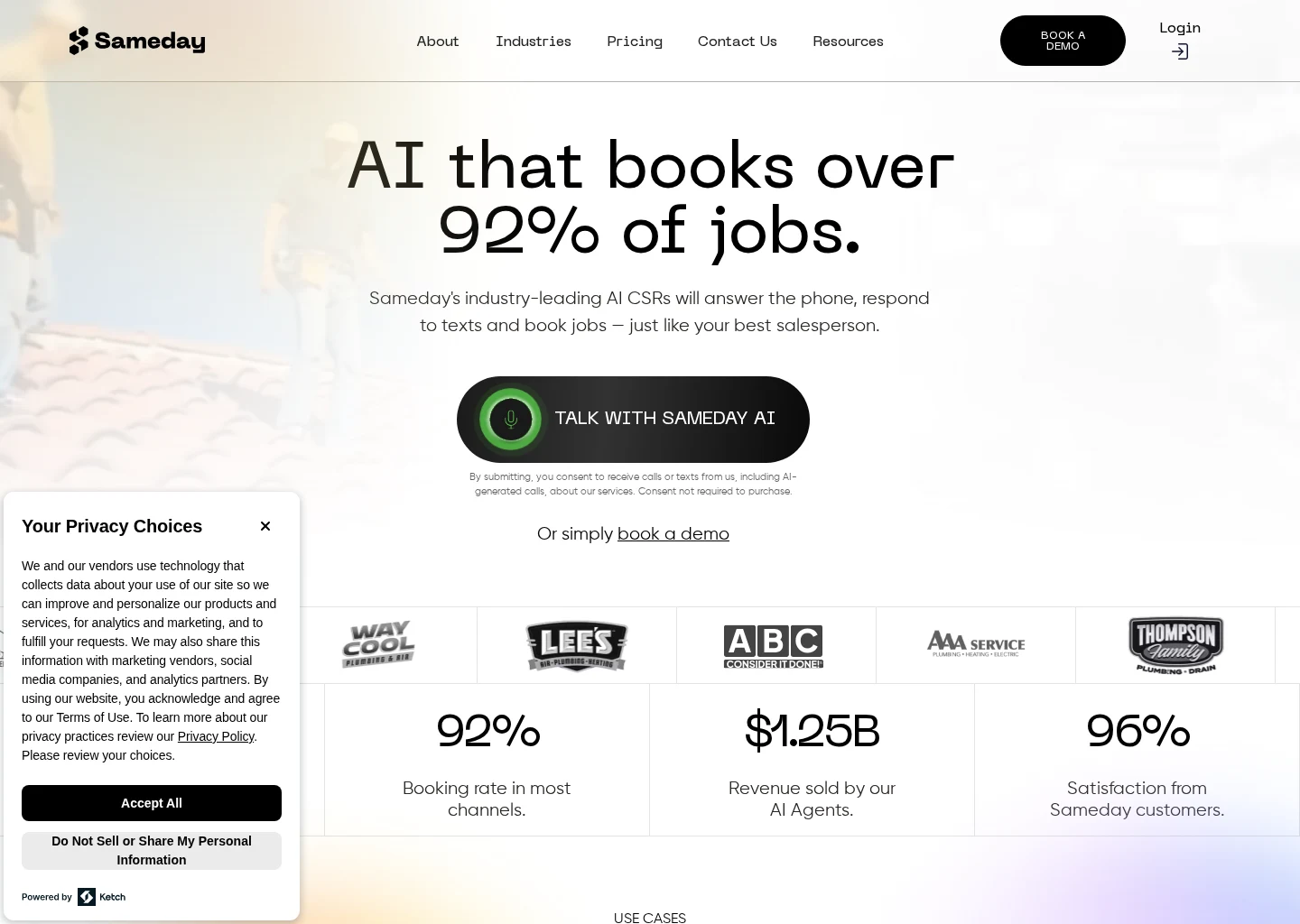
- Sameday describes itself as an AI receptionist and scheduling product for home service businesses and lists integrations with ServiceTitan and Housecall Pro.
- Avoca describes itself as an AI contact center platform focused on service businesses and references CRM integration.
- Goodcall describes itself as a horizontal AI phone platform for configurable call handling and follow-up workflows, with API and CRM integration options.
- Smith.ai describes itself as an AI and virtual receptionist provider with human-backed call answering options and lists integrations including CRM, calendar, and Zapier.
Those signals are useful, but they are not enough by themselves. What often determines success is still unclear from high-level product pages:
- how deep the scheduling integration goes
- whether dispatch rules can be enforced reliably
- how custom emergency logic is configured
- whether text confirmations are native or workflow-based
- how quickly changes can be made by your team
- whether reporting cleanly connects calls to booked jobs
If you want a broader view of plumbing workflow needs before comparing tools, the Plumbing page outlines the common operational requirements.
Examples from the current evidence set
These are examples from the current source set, not a complete market map for the category. The useful takeaway is the type of workflow each appears to emphasize.
Sameday
Sameday describes itself as an AI receptionist and scheduling product for home service businesses. That positioning is relevant for plumbing buyers because overflow value often comes from the combination of call handling plus booking, not just message capture.
Its listed integrations with ServiceTitan and Housecall Pro make it worth checking if you already run one of those systems. In a demo, verify:
- Can routine jobs be booked directly?
- What fields are captured before booking?
- How are emergency calls excluded from standard booking?
- Can rules differ by office hours, weekends, and on-call windows?
Avoca
Avoca describes itself as an AI contact center platform focused on service businesses. That may fit teams with heavier inbound complexity and a need for structured routing across many calls.
For a plumbing buyer, the practical question is whether that broader orientation translates into the front-desk outcomes you need:
- urgent triage
- routine appointment capture
- handoff to on-call staff
- CRM logging that the office can actually use
Goodcall
Goodcall describes itself as a horizontal AI phone platform for configurable call handling and follow-up workflows. That makes it relevant for plumbing owners who want a more customizable call flow and already know how calls should be handled.
The tradeoff to assess is whether a horizontal platform gives you enough plumbing-specific fit without creating extra setup work. Ask:
- How much of the call logic must be built from scratch?
- How are emergency branches tested?
- How are booking and follow-up workflows connected to your systems?
- Who owns ongoing changes when your policies shift?
Smith.ai
Smith.ai describes itself as an AI and virtual receptionist provider with human-backed call answering options. For plumbing companies, that hybrid model may be worth examining if you want AI efficiency with a path to human support for edge cases.
Its listed integrations include CRM, calendar, and Zapier. The key questions are practical:
- When does AI hand off to a human?
- How are urgent plumbing situations prioritized?
- Can the team follow your exact emergency policy?
- Is booking direct, calendar-based, or lead-capture-first?
Questions to ask before you buy
Do not let the evaluation stop at “Can it answer calls?” Ask these questions instead:
Workflow and emergency handling
- What exactly happens when all office staff are busy at 8:15 AM?
- What exactly happens when a caller reports active flooding at 9:30 PM?
- How does the system distinguish emergency, urgent, routine, and non-service calls?
- What details are captured before escalation?
Booking and customer communication
- Can routine jobs be booked during the call, and under what rules?
- Can the workflow send text confirmations automatically?
- What is still manual after deployment?
Systems and reporting
- What integrations are native, and what requires API or automation work?
- How are transcripts, notes, and recordings surfaced to the office?
- How are booked jobs reported so ROI can be measured?
If a vendor cannot walk through these answers clearly, the risk is that you buy “coverage” but still rely on staff to rescue the workflow later.
When after-hours answering is enough and when it is not
Some plumbing companies truly have a narrow problem: the phones are fine during business hours, but evenings and weekends are messy. In that case, a focused after-hours answering workflow may be enough.
When after-hours coverage may be sufficient
That is more likely when:
- office coverage is reliable during live hours
- missed calls are mostly time-based, not spread across the day
- the main gap is emergency screening after close
- routine after-hours calls can wait until morning
When you need a broader overflow workflow
If you miss calls in the morning rush, at lunch, during dispatch, and after-hours, then a standalone after-hours service only fixes part of the revenue leak.
In that case, the smarter buy is a unified overflow model that applies different rules by time and urgency.
How related searches map back to the same decision
Buyers often search different phrases for the same operational problem.
Different query, same buying question
- AI call overflow for plumbing companies = how to catch missed live calls and turn them into booked jobs
- After hours answering service for plumbers = how to handle calls when the office is closed
- AI call overflow for home service businesses = a broader category search that still points to response quality, booking logic, and urgent routing
For a plumbing owner, these are not three separate projects. They are three angles on one system design question:
When a customer calls and no staff member can answer immediately, what happens next?
The right answer should be consistent, fast, and commercially useful. It should also reflect plumbing realities, especially emergency judgment and schedule discipline. If you are mapping this question back to broader front-desk options, the AI Call Answering Hub and the Plumbing overview can help frame the category.
Final recommendation
If your office misses calls during busy periods, lunch, after-hours, or demand spikes, prioritize an AI overflow workflow built around plumbing triage and booking, not a generic answering layer.
The buying priority
Look for a workflow that can deliver:
- immediate answer coverage
- emergency versus routine classification
- direct booking for clear, non-emergency work
- text confirmation
- human escalation for true emergencies and edge cases
- reporting tied to booked jobs
Conditional fit from the current evidence set
Within the current evidence set, Sameday, Avoca, Goodcall, and Smith.ai illustrate different approaches rather than a proven winner for every plumbing company.
- Sameday may be worth closer review if you want home-service-oriented booking and already use ServiceTitan or Housecall Pro.
- Avoca may fit better if your operation needs more structured routing across heavier inbound demand.
- Goodcall may fit teams that want configurable call logic and can support a more custom setup.
- Smith.ai may fit shops that want AI handling with human backup for edge cases.
The right choice depends on what you can verify in your own environment: emergency routing, booking quality, text confirmation, system fit, and reporting against booked jobs, not just answered calls.
FAQ
Is AI call overflow the same as a plumber answering service?
Not exactly. A plumber answering service can simply capture messages or route calls. AI call overflow is more specific when it is set up well: it should qualify the call, identify urgency, book routine work when allowed, text confirmations, and escalate real emergencies. Some providers may cover both categories, but the important distinction is workflow depth, not label.
What should a plumbing company measure first after launch?
Start with:
- booked jobs recovered from overflow calls
- emergency escalations handled correctly
- reduction in missed-call callbacks
- time saved for office staff
- caller outcomes by time of day
That is more useful than raw call counts. If your system answers more calls but does not improve booked outcomes, it is not solving the core business problem.
Can one system handle both overflow and after-hours?
Often yes, and for many plumbing companies that is the more practical setup. The key is using different rules for live-office overflow versus closed-hours coverage. You want one operational policy framework, not one script trying to treat every situation the same. If you are weighing those coverage models, After-Hours Answering gives the time-based side of the comparison.
Should I choose a broad AI contact-center platform or a plumbing-focused workflow?
Usually start with the workflow, not the platform label. If your real need is overflow capture, emergency triage, and job booking, buy for that outcome first. A broader platform can make sense if your operation is larger and more process-heavy, but it should still prove that it handles plumbing urgency and scheduling cleanly.
What if pricing is hard to compare?
That is common. When pricing detail is unclear, compare vendors on the things that drive actual value:
- how many calls they can convert into booked jobs
- how accurately they triage emergencies
- how much office work they remove
- how cleanly they fit your CRM or FSM
- how easy it is to adjust rules as your business changes
That gives you a more reliable decision than chasing the lowest apparent cost per call.
Supporting visuals
Visual proof and context
Screenshots and images that support this article, with sources noted.
Source-backed evidence from www.gosameday.com
Captured evidence
SourceFrequently Asked Questions
Sources